Free worksheet · Rod Amora
Choose your first AI workflow.
You can probably name a few jobs in your firm that you'd like AI to help with. Deciding which one to start with is harder, because you need to know what would actually have to change.
I made this spreadsheet to help you work through that decision. Put up to three jobs next to each other, check what each one needs, then choose a small test you can explain to the person who owns the work.
Download the worksheetFree Excel workbook (.xlsx). No email required.
How to use it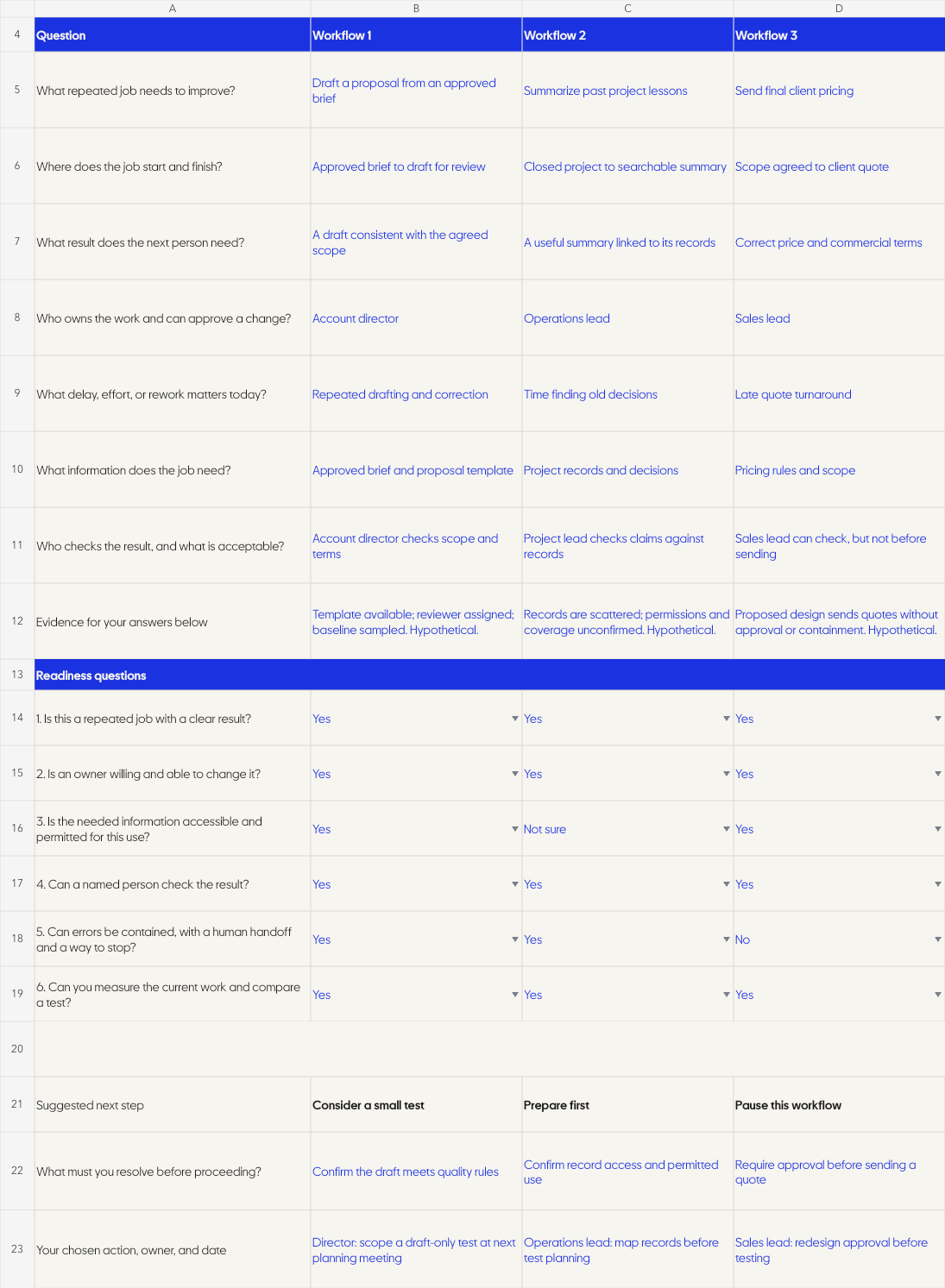
Start with a job you already know.
This is for owners and operational leaders of established small and medium-sized businesses across industries. You have a team, repeatable work, people responsible for it, and something in the process that takes longer or comes back more often than it should.
You don't need to have chosen an AI tool. Start with the work, what goes into it, what a useful result looks like, and who can tell you when the result is wrong.
I co-founded Berry and ran its AI transition as CTO and Chief AI Officer. I started out unable to see where AI fit in my own company, so I know that being told to find a use case doesn't help much on its own. You need a way to look at the job and decide what to do next.
How to use the worksheet
Read the example first.
Open the Worked example tab. It compares three jobs in a hypothetical agency. One is worth a small test, one needs preparation, and one needs a different approval process before going ahead.
Write down the jobs you're considering.
In Your workflows, use a column for each job. Describe where it starts and finishes, who needs the result, and what causes the trouble today. You can compare up to three, but one is enough to start.
Answer the six questions.
Use Yes, No, or Not sure, and write down what supports your answers. If you don't know whether the information is available, say that. Finding out is part of the work.
Plan a small test with the owner.
Use First test to agree what you'll change, who will check it, what would count as an improvement, and when to stop. Come back after the test and write down what actually happened.
What are you checking?
The six questions ask whether the job has a clear result, someone who can change it, information you're allowed to use, a person who can check the output, a way to contain errors, and something you can measure before and after.
Think about a proposal. Getting a draft written is one part of it, but somebody still needs to check the scope and the terms before it reaches the client. If nobody owns that check, you have something to fix before you start sending proposals faster.
- Consider a small test
- All six answers are Yes. Check the evidence with the person who owns the job, then complete the test plan. This doesn't mean you're ready to roll it out across the firm.
- Prepare first
- There is a No or Not sure that needs work. Find the missing information, agree who owns the change, or establish how you'll measure it before testing.
- Pause this workflow
- You answered No to permitted information use or containing errors with a human handoff and a way to stop. Change that part of the plan before proceeding.
Blank answers need to be completed. These are working rules to help you make a decision, not a validated score for how ready your company is.
Count the work around the AI too.
There's an optional time comparison in the sheet. Include preparation, review, and corrections, because a faster draft doesn't tell you how long it took to finish something the client could use.
If the whole job does take less time, you still need to decide what those hours are for. More client work, fewer mistakes, better follow-up, whatever matters in your firm. The spreadsheet shows hours you might free up, it doesn't turn them into cash savings.
If you want to go further with that question, use the AI ROI Calculator. If you're still trying to understand where the whole firm stands, start with the AI Readiness Assessment.
Bring one job to the conversation.
Download the sheet and fill it in with the person who knows the work. You should leave knowing what you want to test, or what you need to sort out first. Either answer gives you something useful to do.
Download the worksheetFour tabs, with a guide, a blank comparison, a worked example, and a test plan.
If you want to talk it through with me, tell me about your firm and the job you're considering. Leave client details and confidential records out of anything you send.